Category: General

  • Building a Video Game Recommender System

    Building a Video Game Recommender System

    As a code coach at theCoderSchool, I teach and guide young students in the development of software applications. Some apps are simple calculator apps, mad libs generators, and implementations of popular games like Tic-Tac-Toe and Connect Four. Other apps are as complex as web scrapers, networked multi-player space shooters, and Rubik’s cube solvers. Recently I’ve been working with one my advanced students on a video game recommender system. I immediately had the thought to document our process in a series of blog posts.

    A recommender system helps users discover new products and services that users would otherwise not discover on their own. Companies like Amazon and Netflix use recommender systems to suggest new products and movies for their users to buy and watch. Recommender systems work by examining how similar items are to the ones used by users in the past.

    In a series of blog posts I will guide you through the development of different recommender systems using the Steam Video Game Dataset. At the end of this post, you will learn how to create a very basic content-based recommender system that will recommend video games to existing users. 

    This post assumes that you have a solid understanding of Python and the pandas open source python module. If your knowledge of Python and pandas is shakey, make sure to brush up on them before proceeding.

    Checking out the Steam Video Game Dataset

    The Steam Video Game Dataset provides several JSON files that contains information about reviews on the Steam platform, user and item metadata, and item bundles. For the recommender system we will be building in this post, we will be using the User and Item Data and Item metadata JSON files.

    The User and Item Data file contains information collected from over 5 million steam users. Pictured below is the JSON object structure for a single user.

    {'items': [{'item_id':<int>,
          'item_name': <string>,
          'playtime_2weeks': <int>,
          'playtime_forever':<int>},
          …],
      'items_count': <int>,
      'steam_id': <string>,
      'user_id': <string>
      'user_url': <string>}

    The items element contains a list of video games played by a single user and the amount of time the user spent playing each game.

    The items_count element provides the total number of games played by the user.  The steam_id, user_id, and user_url are unique identifies for the user within steam platform.

    The Item metadata file provide data 32,000 games on Steam. Below is the json object for one items in the dataset.

    {'app_name': 'Lost Summoner Kitty',
      'developer': 'Kotoshiro', 
      'discount_price': 4.49, 
      'early_access': False, 
      'genres': ['Action', 'Casual', 'Indie', 'Simulation', 'Strategy'],
      'id': '761140', 
      'price': 4.99, 
      'publisher': 'Kotoshiro',
      'release_date': '2018-01-04', 
      'reviews_url': ' http://steamcommunity.com/app/761140/reviews/?browsefilter=mostrecent&p=1', 
      'specs': ['Single-player'], 
      'tags': ['Strategy', 'Action', 'Indie', 'Casual', 'Simulation'], 
      'title': 'Lost Summoner Kitty',
       'url': ' http://store.steampowered.com/app/761140/Lost_Summoner_Kitty/'}

    Now that you’re acquainted with the data that we will be using, I’ll now provide an overview on how the recommender will be built.

    How the Recommender Will Work

    We will develop a simple algorithm that will find video games that are similar in characteristics to games that user has played in the past. The JSON data files covered in the last section will be used to build two tables.

    The first table, which we will call the game_features table contains the attributes of each game in the dataset.

    game idgenre 1genre ntag 1tag nspec 1spec n
    xxxxxxxx101000
    xxxxxxxx000111
    xxxxxxxx100010
    xxxxxxxx011101
    xxxxxxxx100000

    We will use the genres, tags, and specs fields from the item metadata file to create a set of binary features for each game. Games that have the particular attribute will have the value 1, otherwise the value will be 0.

    The second table will contain preferred video game characteristics for each user. We’ll call this table the user_features table

    user idgenre 1genre ntag 1tag nspec 1spec n
    xxxxxxxx011110
    xxxxxxxx100010
    xxxxxxxx100000
    xxxxxxxx000101
    xxxxxxxx100001

    This table has the same structure as the game_features table. Each binary feature indicates whether or not the user has played a game that has that particular attribute.

    Given an existing user, the algorithm wil recommend new games by performing the following actions:

    1. Filter out all the games from the game_features table that was already played by the user.
    2. Compute a similarity score between each game in the game_features table and the user’s preferred game characteristics. We will be dissimilarity scoring method covered in my post on the K-modes algorithm.
    3. Return the top 10 games with the lowest dissimilarity score.

    Now that you know how the algorithm will work, let’s start coding!

    Loading the Steam Games Dataset

    First things first. We will read the item data file, parse the JSON objects and create a Pandas data frame containing the fields from each object. Because the item metadata file contained improperly formatted JSON, the pandas read_json() function could not be used to create the dataframe. We will need to iterate through each json object indepedently and parse them using the python ast module.

    with open('steam_games.json','r',encoding='utf8') as f:
    data = f.read()
    data = data.strip().split("\n")
    steam_games = []
    # The steam games dataset is not a properly formatted json file. Because of this we need to iterate through each individual JSON object and use
    # the ast module to parse the object.
    for entry in data:
    game = ast.literal_eval(entry)
    # Convert the genres, tags, and specs field from a string type to a list type
    if 'genres' in game:
    game['genres'] = ','.join(game['genres'])
    else:
    game['genres'] = None
    if 'tags' in game:
    game['tags'] = ','.join(game['tags'])
    else:
    game['tags'] = None
    if 'specs' in game:
    game['specs'] = ','.join(game['specs'])
    else:
    game['specs'] = None
    steam_games.append(game)
    # Create a dataframe
    steam_games_df = pd.DataFrame(steam_games)
    del(steam_games)

    Here’s what some of the data from the resulting data frame looks like:

    item metadata dataframe

    Building the Steam Game Features Table

    With the item metadata loaded, we can now build the game_features table. But before we do that, let’s examine the values of genres, tags, and specs attributes. The code snippet below creates a pandas series for each attribute.

    genres = []
    tags = []
    specs = []
    for idx in range(steam_games_df.shape[0]):
      game_genre = steam_games_df.iloc[idx]['genres']
      game_tags = steam_games_df.iloc[idx]['tags']
      game_specs = steam_games_df.iloc[idx]['specs']
      if game_genre:
        genres.extend(steam_games_df.iloc[idx]['genres'].split(","))
      if game_tags:
        tags.extend(steam_games_df.iloc[idx]['tags'].split(","))
      if game_specs:
        specs.extend(steam_games_df.iloc[idx]['specs'].split(","))
    
    genres_srs = pd.Series(genres)
    tags_srs = pd.Series(tags)
    specs_srs = pd.Series(specs)

    Using the pandas series unique() method, we can obtain the unique values for each attribute.

    genres_srs.unique()
    >> array(['Action', 'Casual', 'Indie', 'Simulation', 'Strategy',
           'Free to Play', 'RPG', 'Sports', 'Adventure', 'Racing',
           'Early Access', 'Massively Multiplayer',
           'Animation &amp; Modeling', 'Video Production', 'Utilities',
           'Web Publishing', 'Education', 'Software Training',
           'Design &amp; Illustration', 'Audio Production', 'Photo Editing',
           'Accounting'], dtype=object)
    
    tags_srs.unique()
    >> array(['Strategy', 'Action', 'Indie', 'Casual', 'Simulation',
           'Free to Play', 'RPG', 'Card Game', 'Trading Card Game',
           'Turn-Based', 'Fantasy', 'Tactical', 'Dark Fantasy', 'Board Game',
           'PvP', '2D', 'Competitive', 'Replay Value',
           'Character Customization', 'Female Protagonist', 'Difficult',
           'Design & Illustration', 'Sports', 'Multiplayer', 'Adventure',
           'FPS', 'Shooter', 'Third-Person Shooter', 'Sniper', 'Third Person',
           'Racing', 'Early Access', 'Survival', 'Pixel Graphics', 'Cute',
           'Physics', 'Science', 'VR', 'Tutorial', 'Classic', 'Gore',
           "1990's", 'Singleplayer', 'Sci-fi', 'Aliens', 'First-Person',
           'Story Rich', 'Atmospheric', 'Silent Protagonist',
           'Great Soundtrack', 'Moddable', 'Linear', 'Retro', 'Funny',
           'Turn-Based Strategy', 'Platformer', 'Side Scroller',
           'Massively Multiplayer', 'Clicker', 'Gothic', 'Isometric',
           'Stealth', 'Mystery', 'Assassin', 'Comedy', 'Stylized', 'Co-op',
           'War', 'Rome', 'Historical', 'Open World', 'Realistic', 'Crafting',
           'Trading', 'MMORPG', 'Swordplay', 'Hunting', 'Violent',
           'Experience', 'City Builder', 'Building', 'Economy',
           'Base Building', 'Education', 'Golf', 'Wargame', 'Cold War',
           'Real-Time with Pause', 'RTS', 'Diplomacy', 'Psychological Horror',
           'Sandbox', 'Mod', 'Online Co-Op', 'Animation & Modeling', 'Puzzle',
           'Horror', 'Management', 'Futuristic', 'Cyberpunk', 'Destruction',
           'Music', 'Driving', 'Arcade', 'Mechs', 'Robots', 'Underground',
           'Exploration', 'Point & Click', '4X', 'Trains', 'Top-Down',
           'Underwater', 'Turn-Based Tactics', 'Lovecraftian', 'Lara Croft',
           'Remake', 'Action-Adventure', 'Dinosaurs', 'Parkour', '3D Vision',
           'Hack and Slash', 'Spectacle fighter', 'Character Action Game',
           "Beat 'em up", 'Demons', 'Controller', 'Detective', 'Episodic',
           'Zombies', 'Fast-Paced', '2.5D', 'World War II', 'Supernatural',
           'Alternate History', 'Vampire', 'Space', 'Warhammer 40K',
           'Games Workshop', 'Real-Time', 'Steampunk', 'Dystopian',
           'Political', 'Dark', 'Action RPG', 'Grand Strategy',
           'Real Time Tactics', 'Medieval', 'Hidden Object', 'Crime',
           'Survival Horror', 'Mature', 'Noir', 'Bullet Time', 'Cinematic',
           'Nudity', 'Co-op Campaign', 'FMV', 'Match 3', 'Anime',
           'Touch-Friendly', 'Military', 'Western', 'Family Friendly',
           'Ninja', 'Arena Shooter', 'Naval', 'Agriculture', 'Horses',
           'Flight', 'TrackIR', 'Tanks', 'Cult Classic', 'Puzzle-Platformer',
           'Post-apocalyptic', 'Inventory Management', 'Benchmark',
           'Space Sim', 'Choices Matter', 'Based On A Novel',
           'Multiple Endings', 'Magic', 'LEGO', 'Batman', 'Local Co-Op',
           'Superhero', 'Comic Book', 'Local Multiplayer', 'Offroad',
           'Satire', 'Surreal', 'Capitalism', 'Bowling', 'Dark Humor',
           'Level Editor', 'Mythology', 'Time Attack', 'Colorful', 'Short',
           'Tower Defense', 'Top-Down Shooter', 'Villain Protagonist',
           'Fighting', 'Team-Based', 'Split Screen', 'Party-Based RPG',
           'CRPG', 'Pirates', 'Walking Simulator', 'Psychological', 'Memes',
           '3D Platformer', 'Psychedelic', 'Score Attack', 'Abstract',
           'Hex Grid', 'Tactical RPG', 'Turn-Based Combat', 'America',
           '2D Fighter', 'Star Wars', '1980s', 'Mini Golf',
           'Time Manipulation', 'Time Travel', 'On-Rails Shooter',
           '4 Player Local', 'Relaxing', 'Hand-drawn', 'Dungeon Crawler',
           'Loot', 'Cartoon', 'Mouse only', 'Experimental', 'Dragons',
           'Romance', 'Metroidvania', 'Parody', 'Quick-Time Events',
           'World War I', "Shoot 'Em Up", 'Music-Based Procedural Generation',
           'Twin Stick Shooter', 'Rhythm', 'Bullet Hell', '6DOF', 'Modern',
           'Class-Based', 'PvE', 'Heist', 'Politics', 'Resource Management',
           'Conspiracy', 'Minimalist', 'JRPG', 'Visual Novel', 'Hacking',
           'Strategy RPG', 'Lemmings', 'Illuminati', 'Sexual Content',
           'Movie', 'Blood', 'MOBA', 'Rogue-like', 'Runner', 'Narration',
           'Asynchronous Multiplayer', 'Chess', 'God Game', 'Soundtrack',
           'Procedural Generation', 'Rogue-lite', 'Perma Death',
           'Kickstarter', 'Investigation', 'Thriller', 'Cartoony',
           'Crowdfunded', 'Transhumanism', 'Interactive Fiction',
           'Dating Sim', 'Werewolves', 'Documentary', 'RPGMaker',
           'Gun Customization', 'Video Production', 'Software', 'e-sports',
           'Martial Arts', 'Mars', 'GameMaker', 'Utilities', 'Web Publishing',
           'Game Development', 'Choose Your Own Adventure', 'Text-Based',
           'Football', 'Soccer', 'Intentionally Awkward Controls', 'Gambling',
           'Software Training', 'Sokoban', 'Drama', 'NSFW',
           'Dynamic Narration', 'Typing', 'Pinball', 'Voxel', 'Basketball',
           'Fishing', 'Programming', 'Audio Production', 'Sailing', 'Mining',
           'Dark Comedy', 'Grid-Based Movement', 'Otome', 'Voice Control',
           'Artificial Intelligence', 'Cycling', 'Gaming', 'Photo Editing',
           'Lore-Rich', 'Word Game', 'Pool', 'Conversation', 'Nonlinear',
           'Spelling', 'Foreign', 'Feature Film', 'Hardware', 'Steam Machine',
           'Philisophical', 'Mystery Dungeon', 'Wrestling', '360 Video',
           'Faith', 'Bikes'], dtype=object)
    
    specs_srs.unique()
    >> array(['Single-player', 'Multi-player', 'Online Multi-Player',
           'Cross-Platform Multiplayer', 'Steam Achievements',
           'Steam Trading Cards', 'In-App Purchases', 'Stats',
           'Full controller support', 'HTC Vive', 'Oculus Rift',
           'Tracked Motion Controllers', 'Room-Scale', 'Downloadable Content',
           'Steam Cloud', 'Steam Leaderboards', 'Partial Controller Support',
           'Seated', 'Standing', 'Local Co-op', 'Shared/Split Screen',
           'Valve Anti-Cheat enabled', 'Local Multi-Player',
           'Steam Turn Notifications', 'MMO', 'Co-op', 'Online Co-op',
           'Captions available', 'Commentary available', 'Steam Workshop',
           'Includes level editor', 'Mods', 'Mods (require HL2)', 'Game demo',
           'Includes Source SDK', 'SteamVR Collectibles', 'Keyboard / Mouse',
           'Gamepad', 'Windows Mixed Reality', 'Mods (require HL1)'],
          dtype=object)

    As you can see, the attributes have an exteremly high cardinality. To address it, we will group infrequently occurring values for each attribute into an ‘other’ category. In future posts, we will explore other methods for dealing with categorical data with high cardinality. The code snippet below identifies the groupings for each attribute and then creates column names that will be used when we build the game_features table.

    # Genres that occur less than 1% of the time will be grouped in and 'other' category
    genre_counts = genres_srs.value_counts(normalize=True)
    other_genres = genre_counts[genre_counts < 0.01].index.to_list()
    genre_main_categories = ['genre_'+x for x in genre_counts[genre_counts >= 0.01].index.to_list()]
    # Tags that occur less than 0.1% of the time will be grouped in an 'other' category
    tag_counts = tags_srs.value_counts(normalize=True)
    other_tags = tag_counts[tag_counts < 0.001].index.to_list()
    tag_main_categories = ['tag_'+x for x in tag_counts[tag_counts >= 0.001].index.to_list()]
    # Specs that occur less than 0.1% of the time will be grouped in an 'other' category
    specs_counts = specs_srs.value_counts(normalize=True)
    other_specs = specs_counts[specs_counts < 0.01].index.to_list()
    specs_main_categories = ['spec_'+x for x in specs_counts[specs_counts >= 0.001].index.to_list()]
    game_features = []
    for idx in range(steam_games_df.shape[0]):
    # Obtain list of genres, tags, and specs
    game_genre = steam_games_df.iloc[idx]['genres']
    game_tags = steam_games_df.iloc[idx]['tags']
    game_specs = steam_games_df.iloc[idx]['specs']
    data_row = {k:0 for k in feature_columns}
    data_row['id'] = steam_games_df.iloc[idx]['id']
    # Iterate through each entry in the lists and create the binary features
    if game_genre:
    for genre in game_genre.split(','):
    if genre in other_genres:
    data_row['genre_other'] = 1
    else:
    data_row['genre_'+genre] = 1
    if game_tags:
    for tag in game_tags.split(','):
    if tag in other_tags:
    data_row['tag_other'] = 1
    else:
    data_row['tag_'+tag] = 1
    if game_specs:
    for spec in game_specs.split(','):
    if spec in other_specs:
    data_row['spec_other'] = 1
    else:
    data_row['spec_'+spec] = 1
    game_features.append(data_row)
    game_features_df = pd.DataFrame(game_features)

    Here’s what the dataframe looks like:

    item features table

    Building the User Features Table

    We will now use the game_features table built in the last section to create the user_features table. We will load the user items json file, retrieve the list of games played for each user. Each game will be cross-referenced with the game_features table to determine the user’s preferred game characteristics. We will also store the user’s play history for later usage when it comes time to recommend new games to the user. Because the user items json file contains data for over 5 million users, the code snippet below will take a considerable amount of time to execute. To speed things up, you can reduce the number of records that are parsed.

    game_features_df = game_features_df.set_index('id')
    # Convert game features dataframe into a dictionary to speed up the construction of the users table
    game_feat_dict = game_features_df.to_dict()
    # Read user items data file and build features table
    with open('/content/drive/MyDrive/VideoGameRecFiles/australian_users_items.json','r',encoding='utf8') as f:
    data = f.read()
    data = data.strip().split("\n")
    user_features = []
    # We need to keep track of all the games each user played so we can avoid recommending games that they have already played.
    user_play_list = {}
    for user_data in data:
    # The stdataset is not a properly formatted json file. Because of this we need to iterate through each individual JSON object and use
    # the ast module to parse the object.
    record = ast.literal_eval(user_data)
    data_row = {k:0 for k in feature_columns}
    data_row['user_id'] = record['user_id']
    play_list = []
    for item in record['items']:
    item_id = item['item_id']
    play_list.append(item_id)
    for col in feature_columns:
    if item_id in game_feat_dict[col]:
    if game_feat_dict[col][item_id] == 1:
    data_row[col] = 1
    user_play_list[record['user_id']] = play_list
    user_features.append(data_row)
    user_features_df = pd.DataFrame(user_features)
    user_features_df = user_features_df.set_index('user_id')

    Here’s what the resulting table will look like:

    user features table

    The Recommender Algorithm

    With the game_features and user_features table now in place, we can now code the recommender algorithm.

    def dissimilarity_score(user, item):
    '''
    Given a row from the user features table and a row from the item features table, compute the dissimiliary score between the user and the item.
    The higher the score, the more dissimilar the two records are.
    '''
    score = 0
    for col in feature_columns:
    data = 0
    if user[col] != item[col]:
    score += 1
    return score
    def recommend_games(user_id, n=10):
    '''
    Given a user id, recommend games to that user. By default 10 games are recommended
    '''
    # Get user features
    user = user_features_df.loc[user_id]
    # Get games played by the user
    play_list = user_play_list[user_id]
    # Filter out the games already played by the user from the games features table
    filtered_df = game_features_df[~game_features_df.index.isin(play_list)]
    # Compute dissimilarity scores for each game
    scores = filtered_df.apply(lambda game: dissimilarity_score(user, game), axis=1)
    # Return the top n games
    recommended_games = scores.sort_values()[:n].index
    return recommended_games

    The code snippet above defines two functions. The dissimilarity_score function is the scoring function that will determine how similar a game is to a user’s game characteristics. The recommend_games function uses the dissimilarity_score function to provide the ids of games that are similar to a user’s preferences.

    Here’s what we get when recommeding new games for the steam user ‘evcentric’

    recommended_games = recommend_games('evcentric')
    recommended_games
    >>Index(['451600', '302670', '346330', '204360', '238460', '512900', '351100',
           '306460', '344890', '257750'],
          dtype='object', name='id')

    We can use the following code snippet to get the names of the titles

    for game in recommended_games:
      filtered_games = steam_games_df[steam_games_df.id == game]
      game_name = filtered_games.iloc[0]['app_name']
      print(game_name)

    We get the following as output

    CounterAttack
    Call to Arms
    BrainBread 2
    Castle Crashers®
    BattleBlock Theater®
    Streets of Rogue
    Niffelheim
    Unturned - Permanent Gold Upgrade
    ARM PLANETARY PROSPECTORS Asteroid Resource Mining
    Bloody Trapland

    That’s all, Folks!

    We have created a basic video game recommender. There are definitely more enhancements we can make to the recommender in order to get better results. That is what we will be covering in the next series of posts. You can find the code for the entire solution here.

  • PCA and the Nuts and Bolts of It

    PCA and the Nuts and Bolts of It

    Clustering high dimensional datasets can be problematic. In my last blog post, I mentioned a few methods that can be used to clustering data with many dimensions. Today, we will be exploring one of these methods more in detail. By the end of this post you will gain an intuitive understanding of Principal Component Analysis (or PCA) and learn how to use it effectively.

    What is PCA?

    Principal component analysis is a technique that allows users to reduce the number of dimensions of the dataset. Given a dataset with numerous attributes, PCA creates another dataset that has significantly less attributes. The amazing part about this smaller dataset is that it retains a significant amount of the information contained in the original dataset. Clustering algorithms can then be performed on this dataset.

    To give you a sense of how PCA is performed, consider this little toy scenario:

    Let’s say you are a young professional who lives in the San Francisco Bay Area. As a multi-hobbyist, you partake in over 20 recreational activities on a weekly basis. It just so happens that you, like many bay area residents, also work at a technology startup — and a rather demanding one at that. For the sake of both your health and your career, you decided to cut back on the amount of activities you take part in. Deciding on which activities to drop, however, is a very difficult task for you — you enjoy them all very much. You found an app that can help you pair your list down significantly. You punch in all 20 of your activities into the app and in a matter of seconds it outputs a list of five activities. These activities provide a significant majority of all the enjoyment you experience on a weekly basis.

    The five activities are known as principal components.

    PCA: 1st Principal component

    Pictured above is a green line superimposed on a scatter plot of points. This green line is the first  principal component. The principal component is chosen so that all the data points are spread out along the line as much as possible.

    PCA: 1st and 2nd Principal Components

    Now pictured is the same green line with the addition of another line along another direction. The additional line is the second principal component. Chosen so that it maximizes the spread of the data in another direction.

    The goal of principal component analysis is to produce one or more of these lines. Each line represents the maximum spread of the data in one direction (i.e. dimension). After we find all of these lines, we choose the few of the lines that cover the majority of the variance of the data and throw out the rest. These selected components are then used to transform our dataset into a lesser dimensions. 

    Now for some math

    Now that you understand principal component analysis at a high level, let me show you what it looks like mathematically.

    A dataset is represented mathematically as a matrix with n rows and p columns. 

    PCA begins with a simple rescaling of all the attributes in the dataset. As the goal is to select features that explain the most variance in the in dataset, rescaling the data ensures that this process isn’t impacted by different scales in the data. You can check out this post [link to post] for more information about data scaling.

    Using the rescaled matrix, a covariance matrix is computed. A covariance matrix is a square matrix that describes the variance present in the attributes in the dataset and the covariance between two attributes. The covariance matrix is computed as follows:

    The elements on the diagonal of the matrix from the left to the right represent the variance of a single attribute.  The non diagonal elements represent the covariance between two attributes.  Both are computed as follows:

    The covariance matrix describes the relationships between each attribute in the dataset. Using the covariance matrix, we can determine how two attributes vary in relation to one another, and also identify attributes that are highly correlated.

    With the covariance matrix in hand, the next step is to decompose the matrix into a set of eigenvalues and eigenvectors. An eigenvector is a vector that retains its direction when it is transformed by a matrix.

    In the image above, the notice that every line, except the green line change direction after the image is transformed.  The green line is an eigenvector. The green line merely stretches in size as a result of the transformation. The amount by which the green line stretches is called an eigenvalue.

    This stretching is represented in linear algebra with the following equation:

    M in the formula above represents a square matrix, v represents a vector, and lambda represents the eigenvalue. The product of multiplying the matrix by the vector is the same as multiplying the vector by the eigenvalue.

    Another way to think of eigenvectors is as the north and south pole axis on a globe. As you rotate the globe by this axis, every point on the globe changes direction except for the points along the axis. 

    Finally, we take the p eigenvalues and corresponding eigenvectors that were computed and order the eigenvectors by decreasing eigenvalue. Eigenvalues represent the variance of the dataset along a particular dimension. Therefore, we are essentially ordering the results by decreasing variance.

    The first eigenvector is known as the first principal component. It is the vector that extracts the largest amount of variance present in the dataset, out of all the other eigenvectors computed.

    The second eigenvector is known as the second principal component and extracts the second largest amount of variance.

    The third eigenvector is known as the third principal component and extracts the third largest amount of variance.

    And so on…

    From this point, we decide on the number of principal components we want to keep. Let’s call this number k.  The selected components are then used to create an a p by k matrix of principal components. Let’s call this matrix P.  P is used to transform our dataset into a lower dimensional n by k matrix. This is done by multiplying our dataset by P.

    This entire process is summed up in the following steps:

    1. Rescale dataset (i.e. normalize or standardize)
    2. Compute covariance matrix of dataset.
    3. Find eigenvalues and eigenvectors of covariance matrix.
    4. Order eigenvectors in decreasing order by eigenvalues
    5. Choose k eigenvectors to keep

    How many principal components do I keep?

    Now that you know how to compute principal components, you’re probably wondering how to decide how to determine the optimal number of principal components to keep for dimensionality reduction. You can determine this number using one of two methods.

    Method #1: Selection by Variance Explained

    In the first approach, you retain only the principal components that explain a desired amount of variance in the data.

    1. Determine the percentage of total variance you want to retain.
    2. Sort the eigenvalues in decreasing order
    3. Divide each eigenvalue by the sum of eigenvalues to get the percentage of variance explained.
    4. Add the eigenvalues until you reach the desired amount of variance.

    Here’s an example…

    Suppose after performing PCA on a dataset of 30 features, you obtained the following eigenvalues:

    {5.2090, 99.0224, 33.1024, 17.7019, 54.8435, 91.7130, 5.6278, 10.5985, 101.1147, 109.3971, 78.7155, 49.7158, 39.2546, 57.7061, 44.6071, 39.3120, 26.8996, 1.7817, 57.3353, 85.5184, 112.0761, 27.1018, 102.6468, 74.4120, 13.5147, 25.4182, 23.9367, 6.9049, 76.5605, 63.62}

    If you wanted to keep the principal components that explain 80% of the variance in the dataset here’s what the process would look like.

    1. Sort the eigenvalues in descending order:

    {112.0761, 109.3971, 102.6468, 101.1147, 99.0224, 91.713, 85.5184, 78.7155, 76.5605, 74.412, 63.62, 57.7061, 57.3353, 54.8435, 49.7158, 44.6071, 39.312, 39.2546, 33.1024, 27.1018, 26.8996, 25.4182, 23.9367, 17.7019, 13.5147, 10.5985, 6.9049, 5.6278, 5.209, 1.7817}

    2. Compute the percentage of variance explained by each eigenvalue:

    {0.072996241, 0.071251383, 0.066854847, 0.065856976, 0.064494241, 0.059733558, 0.055698956, 0.051268162, 0.049864589, 0.048465251, 0.041436317, 0.037584538, 0.037343032, 0.035720099, 0.032380378, 0.029053033, 0.025604283, 0.025566898, 0.021559911, 0.017651663, 0.017519968, 0.016555118, 0.015590203, 0.011529418, 0.008802254, 0.006902905, 0.004497228, 0.00366544, 0.003392672, 0.001160438}

    3. Add eigenvalues until you reach the desired amount of variance.

    A running total of the above numbers would produce the following:

    {0.072996241, 0.144247624, 0.211102471, 0.276959447, 0.341453688, 0.401187246, 0.456886202, 0.508154364, 0.558018953, 0.606484204, 0.647920521, 0.685505059, 0.722848091, 0.75856819, 0.790948568, 0.820001601, 0.845605884, 0.871172783, 0.892732694, 0.910384357, 0.927904325, 0.944459443, 0.960049645, 0.971579063, 0.980381317, 0.987284222, 0.99178145, 0.99544689, 0.998839562, 1}

    From the result above, you can see that 80% of the variance is explained by the first 16 components. Those are therefore the principal components we will keep for dimensionality reduction.

    Method #2: Use a scree plot

    A scree plot displays the eigenvalues associated with a component in descending order by the number of that component. The optimal component is the point on the plot that looks like an elbow.

    When not to use PCA

    Principal component analysis projects a dataset into a lower dimensional subspace. As a result of this process, the features in the dataset are morphed into a form that can’t be interpreted. PCA should therefore not be used in situations where interpretability of the features being analyzed is necessary.

    That’s all, folks!

    Next post I will discuss another dimensionality reduction technique called singular value decomposition.

    P.S in case you’d like to explore eigenvalues and eigenvectors deeper, I found an excellent resource that provides an even more intuitive explanation of the concept. Check it out here.

  • High Dimensional Clustering 101

    High Dimensional Clustering 101

    High dimensional data are datasets containing a large number of attributes, usually more than a dozen. There are a few things you should be aware of when clustering datasets such as these. The goal of this post is to highlight a few strategies you can use when performing high dimensional clustering.

    Setting the Stage

    To set the stage for the discussion take a look at the image below.

    Which one of the red points would you say is the closest to the x in the center? As you can see, there’s no clear answer. Some of you reading this may even say that is a nonsensical question to be asking, because these points are roughly equidistant from x. Even if there is a single point that is closer than the others, it would only be by a measly, negligible amount.

    When a data clustering algorithm looks at high dimensional data, the data points could look much like the above image. The results we get back from the algorithms may not capture the patterns present in the dataset. This is known in machine learning as the curse of dimensionality.

    Dum Dum Duuuuuuuuumm… The curse of dimensionality

    The curse of dimensionality is a very interesting, and counterintuitive phenomenon that arises when machine learning algorithms are applied to datasets with a large number of features.

    Data clustering algorithms work by computing distances between data points and grouping together points that are close together in proximity. When the number of features in a dataset is small, the algorithms are able to clearly the data points that are close together from the ones that are not. For datasets with many features, the task of identifying points that are closer together is more challenging. The reason for this is because the distance between points in high dimensions are far away. This is true even for points that are similar to each other.

    Pictured below are two charts. The chart on the left is a 1-dimensional plot of several data points. The chart on the right is a histogram of pairwise distances between each data point pictured in the first plot.

    As shown in the plot on the left, the dataset can be neatly grouped into three clusters. You can also see this from the three peaks in the histogram on the right.

    Here’s what the charts look like when we add a second dimension to the data.

    With the addition of the second dimensions, the distances between each point is larger. Nevertheless a clustering algorithm can still easily cluster these points into 3 groups.

    The same observation can be made if a third dimension was added to the data.

    As more dimensions are added to the dataset the distances between the points become larger and the peaks we observed in the histogram become narrower. After 100,000 dimensions we’ll get a histogram shaped like the one below:

    Euclidean distance of datapoints on a dataset with 100,000 dimensions.

    Wait, isn’t there supposed to be three peaks? At 100,000 dimensions, the distance between the data points became so large that the third cluster we saw in the first 3 plots became indistinguishable from the other two. If we were to run K-means on this dataset, the clusters it would give us would definitely not be what we’d expect.

    Now that you are aware of the curse of dimensionality I will briefly highlight in the next few sessions some methods that you can use to work around it.

    Use Feature Selection

    You don’t need to cluster with every attribute in your dataset. If you’re only interested in a handful of attributes, you can cluster on just those attributes and discard the others. You should also examine your dataset for features that show very little variation or are highly correlated with other features. Those features will not provide any meaningful information to a clustering algorithm and can therefore be discarded.

    Use Dimensionality Reduction

    Another approach for clustering high dimensional data entails projecting the dataset to a lower dimensional space before applying a clustering algorithm. Oftentimes a dataset can be approximated very well using a smaller number of dimensions without losing much information. This can be accomplished by applying techniques from linear algebra such as Principle Component Analysis and Singular Value Decomposition. I will explore both topics more in detail in future posts.

    Use a Graph-based Clustering Algorithm

    Graph based clustering algorithms such as Spectral clustering uses a different criteria for forming clusters that is more robust in high dimensions than K-means and other related methods. I will explore spectral clustering more in detail in a future post.

    That’s all folks!

    In my next post, I explore the topic of dimensionality reduction further by discussing the nuts and bolts of Principle Component Analysis. Stay tuned.

  • Let’s Get Fuzzy with C Means Clustering

    Let’s Get Fuzzy with C Means Clustering

    Not every dataset you will encounter in the wild will have data points that can be neatly placed in a single cluster. You may come across data points that could potentially belong to two, three, or possibly more clusters.

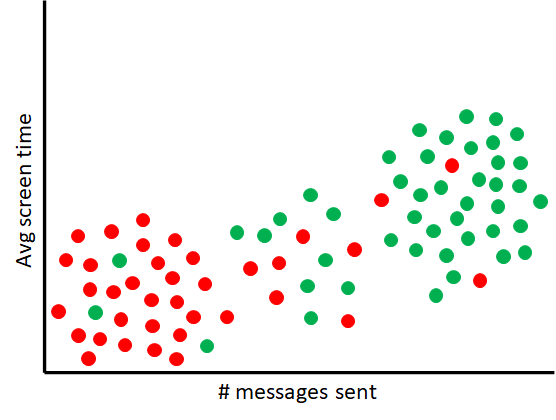
    Consider this scenario. You work as a data analyst for a company that has developed a fitness accountability app. During the first week of January, the company experienced a large number of new app installs. These installs are presumably from people looking to fulfill their new year resolution fitness goals. At the end of the month you gathered a week’s worth of activity data from several of these new users. Below is a scatter plot of this data.

    Data points in red represent users who deleted the app after 1 week of usage. The data points in green are users who are still actively using the app. From the plot it is clear that there’s a relationship between level of app engagement and likelihood to churn. Users furthest to the left are more likely to delete the app after a week, while users furthest to the right are more likely to remain active on the app. A high degree of uncertainty, however, exists for users in the middle of the plot. These users could either churn or remain active. 

    Let’s now suppose you were given the task to group these users into a “churn” and “not churn” categories. You could use a clustering method like K-means to group the users, but information about the degree of uncertainty in the categories would be lost. A new clustering method is needed that would allow you to model the degree a data point is similar to or dissimilar from users that churn and remain active.

    Enter Fuzzy C Means Clustering

    C Means is a k-means variation that assigns each data point probabilities of belonging to each cluster. C Means differs from k-means in two key ways:

    The first difference is that c means constructs a table (i.e. matrix) that contains the probability that each datapoint belongs to a particular cluster. Here’s what the table would look like for a few data points in the problem outlined above:

    UserChurnNot Churn
    A0.250.75
    B0.910.09
    C0.510.49
    D0.170.83

    Each entry in the table has a number between 0 and 1. The larger the number, the more likely that data point belongs to the cluster. The sum of probabilities for each datapoint must also equal 1. If you look at the probabilities for each data point in the data table above, you will see that they indeed do.

    This table, which we will call the fuzzy partition table, is randomly initialized at the start of c-means algorithm and then repeatedly updated, along with the centroid. Each entry in the table is updated using the following equation:

    dist(xi,cj) and dist(xi,cq) represents the Euclidean distance between a datapoint xi and a cluster centroid cj and between xi and cq. You may have also noticed the m exponential term in the numerator and denominator. This is a special parameter that controls the fuzziness of the results. When m is 0, the equation will produce a binary output (1 or 0), akin to what you’d get if K-means was applied. As a matter of fact, you can think about K-means as C-means with the m parameter set to 0.  The larger m is the fuzzier the output is.

    The second key difference lies in the calculation of the centroid on each iteration of the algorithm. The formula is as follows

    If you read my previous post on weighted kmeans, you’ll notice that this is essentially the weighted mean.

    With that, here’s the steps of the C means algorithm:

    1. Choose c, the number of clusters, and m
    2. Randomly select c data points from the dataset to be initial centroids
    3. Randomly choose values for each entry in the fuzzy partition table, subject to the constraint that the values sum to 1.
    4. Compute new centroids
    5. Update the fuzzy partition table
    6. Repeat step 4 and 5 until either there’s no change in the values in the table or the difference is smaller than some threshold.

    Choosing the C in C-Means

    For C means you can use the Elbow method to find the optimal value for c. Below is a modified version of SSE to use when choosing the optimal value for c.

    That’s all folks!

    In my next post I will discuss methods for clustering high dimensional data.

  • Scaling your data before clustering

    Scaling your data before clustering

    You will often need to perform some form of preprocessing on your dataset before running a data clustering algorithm. In this post I will introduce one important preprocessing method that is often overlooked when clustering data. That method, my friends, is called data scaling.

    What is data scaling?

    As you may already know, clustering algorithms work by computing distances (i.e. dissimilarities) between data points in the dataset and grouping together points that are close in proximity. The method used for calculating the distance will be different depending on the algorithm used. One trait most of these methods share is high sensitivity to attributes (also called features) with numerically larger values compared to other attributes in a dataset. These features will bias the distance calculations and can cause the clustering algorithms to produce subpar clusterings.

    To illustrate this, let’s say you have a dataset containing SAT and GPA scores for 5000 college students that you’d like to segment into 4 groups.

    StudentSATGPA
    114191.35
    213841.16
    37843.58
    47483.31
    511240.98
    49966832.02
    49977393.58
    49987413.21
    499910881.01
    50005951.60

    After running K-means on the dataset, you create a scatter plot showing the student scores and the clusters each student is assigned to.

    It’s immediately apparent looking at the plot that a large number of students were mislabeled by the algorithm. SAT scores have a significantly larger numerical scale (400 to 1600) than that of grade point averages (0 to 4). SAT scores therefore have a much larger influence on the  distance measurement K-means uses to group the students.

    As can be seen from the plot, K-means leaned heavily on the SAT scores to cluster the data. To ensure that both GPA and SAT has an equal weight in the clustering both features need to be transformed so they are on the same scale. This is exactly what data scaling is for.

    Here’s the scatter plot we get after scaling the data set and performing k-means:

    Student clusters after applying data scaling

    Data Scaling Techniques

    There are two main methods for scaling data. The first method is called normalization and the second method is called standardization.

    Normalization

    Normalization uses the minimum and maximum to transform features onto the same scale. Below is the formula used to normalize each feature:

    Here’s what the student scores dataset would look like when each feature is normalized:

    StudentSATGPA
    10.8491670.3375
    20.8200000.2900
    30.3200000.8950
    40.2900000.8275
    50.6033330.2450
    49960.2358330.5050
    49970.2825000.8950
    49980.2841670.8025
    49990.5733330.2525
    50000.1625000.4000

    Normalization rescales the dataset features between 0 and 1 or -1 and 1. Normalization is typically used when the numerical distribution of the features is not known. Normalization fails however on datasets with outliers. Allow me to explain why.

    Suppose you have a small dataset containing the following points.

    XY
    01
    23
    53
    1013
    1517
    2030
    2223
    2419
    99025
    100027

    As you can see from the table, the last two data points are outliers. Using normalization, the data points will transform into the following

    XY
    0.0000.000
    0.0020.083
    0.0050.083
    0.0100.500
    0.0150.666
    0.0200.458
    0.0220.583
    0.0240.708
    0.9900.833
    1.0001.000

    Even though normalization shifts the values between 0 and 1, the outliers still remain as outliers. If we were to compare these points using a distance function, the [] feature would have more influence on the measurement.

    Standardization

    Standardization uses the mean and standard deviation to transform a dataset. The formula for transforming each feature is shown below:

    Here, µ is the mean of the feature and σ is the standard deviation of the feature. This is what the same student score dataset from earlier would look like when standardized.

    StudentSATGPA
    11.393781-0.447397
    21.283359-0.634040
    3-0.6095871.743211
    4-0.7231631.477980
    50.463083-0.810861
    4996-0.9282320.210768
    4997-0.7515571.743211
    4998-0.7452481.379747
    49990.349506-0.781391
    5000-1.205864-0.201813

    Standardization is very helpful in cases where the features in the dataset are normally distributed. But your data doesn’t necessarily have to be normally distributed in order to use standardization. Unlike normalization, standardization does not squeeze your data into a bounding range, meaning that it will still work if there’s outliers present.

    That’s all, folks!

    There are many other data scaling techniques that can be used, but normalization and standardization are the two methods that are mainly used in practice. In my next post I will discuss fuzzy clustering.

  • Weighing your k-means data clustering

    Weighing your k-means data clustering

    In my previous post on the K-Prototypes algorithm, I introduced the concept of parameter weighting. With just a single parameter, you can control the amount of influence categorical attributes has on the data clustering. In this post, I’m going to expand on this concept and show how we can control the weightings of entire data points. There are some data clustering problems you will encounter in the real world where this technique is essential.

    Customer Segmentation Case Study

    Consider the following scenario. You were hired by a growing online distributor of flavored milk to help them understand the shopping habits of their customers. The company would like to segment their customers into different groups. In particular, the company would like to understand the representative spend share for each customer group it can effectively firm up its marketing strategy. You are handed a dataset containing the percentage of sales in five different milk products over the past year.

    CustomerIDOrganic MilkCondensed MilkAlmond MilkCoconut MilkSkim Milk
    113.4526.0511.144.9927.44
    224.7319.5216.583.4923.65
    325.5020.4718.142.6623.49
    44.520.107.369.2713.47
    526.4721.0918.41.9021.75
    69.4315.3711.891.7825.81
    74.8321.115.489.4713.80
    85.7618.097.429.9111.25
    95.3618.274.849.9713.01
    107.9920.176.637.912.39

    Customer segmentation problems such as this one is an excellent use case for K-means clustering. The centroids (i.e. center points) produced by k-means can provide the representative customer characteristics that your client is looking for. Taking a look at the distribution of total spend for each customer, you notice that the numbers are heavily skewed.

    Some customers a high spend share in one or more categories, but their total spend is so low that they are less likely to respond to the company’s marketing campaign. Because K-means weighs each data point evenly, it will not take the customer total spend into account and will produce clusters and center points that are misleading.

    In order to get the output we’re looking for, we need to weigh each customer differently. Customers who have a higher total spend should have more influence on the cluster centroids than customers who do not. This is exactly what weighted k-means clustering allows us to do.

    About Weighted K-means clustering

    To perform weighted k-means clustering, we need to make a minor tweak to the way the cluster centroids are calculated after each iteration. Instead of using the mean the calculate the centroids, we use the weighed mean:

    Each data point xi in the dataset is assigned a weighted value wi. Computing the weighted mean for a cluster is just a matter of:

    1. Multiplying each data point by its weight
    2. Computing the sum the products calculated in step 1 together, and
    3. Dividing the sum calculated in step 2 by the sum of all the weights.

    As usual, here’s the weighted k-means clustering procedure, taking in account the new centroid calculation discussed above:

    1. Choose k. Determine the number of clusters to form
    2. Select initial centroids. In this step the algorithm chooses k data points from the dataset at random to be the initial centroids.
    3. Assign data points to a centroid.  In this step the algorithm calculates the Euclidean distance between each data point and each centroid. Data points are assigned to the centroid with the smallest distance.
    4. Calculate weighted centroids. New centroids are calculated by finding the weighted mean of each cluster
    5. Repeat steps 3 and 4. Repeat steps 3 and 4 until no changes in the assignments are made.

    Weighted K-means and Outliers

    Weighed k-means clustering is also useful when clustering datasets with outliers. By assigning small weight values to outlier data points, k-means will form clusters that are robust to these extreme values.

    That’s all folks!

    I hope you found this guide on weighted k-means useful. In my next post, I will discuss data scaling, an important but often overlooked concept that has a huge impact on the data clustering algorithms.

  • Mixed Data Clustering using K-Prototypes

    Mixed Data Clustering using K-Prototypes

    This blog has thus far covered a number of data clustering algorithms. A majority of the algorithms operate under the assumption that the dataset to be clustered is purely numerical. The k-Modes algorithm was the one method we’ve covered that works on purely categorial data. What if you want to cluster a dataset that contains both categorial and numeric data. That’s exactly what the k-prototypes algorithm allows you to do. 

    What is a Prototype?

    In K-Means, the centroids are found by calculating the mean of each cluster’s data points. In K-Modes, these are derived from the mode. For datasets with mix of categorical and numerical data, the centroids are found by calculating the mean of the numeric data and taking the mode of the categorial data. A prototype is simply a combination of the mean and the mode.

     CityEye ColorAgeScore
     MiamiBlue3293
     MiamiGreen2532
     ChicagoBlack2772
     MiamiBlue2163
    PrototypeMiamiBlue26.2565

    The function that is used to check how similar or different each data point is to a prototype is also a combination of the Euclidean distance from K-Means and the matching function from K-Modes:

    Let’s take this function apart and examine what each piece means:

    The red part of the function above is the k-means Euclidean measurement, and the green part is the k-modes matching dissimilarity measurement.

    The symbols p and q in the function above represent two individual data points.

    N and C represent sets of numeric and categorial variables and n and c represent a variable from both sets. The symbols pn, qn, pc, qc represent an numeric and categorial values.

    Something new you might have also noticed is the gamma term:

    This term controls the amount of weight categorial variables contribute to the output.

    A large enough value for gamma would result in more focus being placed categorial variables. As a result, a point could be assigned to a cluster where the cluster’s prototype is not nearest to it in terms of numeric variables, but the categorial values of most of the other points in the cluster matches that point.

    Here’s an example of the dissimilarity function in action using two data points:

     CityEye ColorAgeScore
    pMiamiBlack3293
    qChicagoBlack2772

    From the function above, N would represent a set containing the numeric variables {Age, Score}, and C is a set containing categorial variables {City, Eye Color}.

    Calculating the Euclidean (red) part of the function, we get the following:

    For the matching (green) part of the function, lets suppose that gamma is set to 1.5. Here’s what we’d get:

    Adding the results from both calculations together, the final result is 23.08.

    Here’s the step by step breakdown of the k-prototypes procedure, taking into account everything covered so far:

    1. Choose k and gamma. Determine the number of clusters to form and the amount of weight categorial variables should have on the clustering.
    2. Select initial prototypes. In this step the algorithm chooses k data points from the dataset at random to be the initial prototypes.
    3. Assign data points to a prototype.  In this step the algorithm calculates the dissimilarity between each data point in the dataset and each prototype and assigns the data point to the prototype it is closest to.
    4. Calculate new prototypes. A new prototype is calculated for each cluster using the dissimilarity function described earlier.
    5. Repeat steps 3 and 4. The algorithm reassigns data points to clusters based on how close they are to the new prototypes. After the reassignment new prototypes are computed. This process is repeated until no changes in the assignments are made.

    Determining Optimal Number of Clusters

    Like all the other methods covered before this one, the Elbow method can be used to determine optimal number of clusters. Here’s the new cost function you will be using for the elbow plot:

    As you might have guessed, this is simply a combination of the sum of squared error from k-means and the total dissimilarity score from k-modes.

    But wait, what about optimal values for gamma?

    With the addition of the gamma term, you might be wondering if there’s a method for finding good values for that parameter. Finding optimal values involves pure experimentation. You perform k-prototypes on your dataset several times with different values and choose a value that weighs the categorical and numeric attributes in the way you expect.

    If you’re looking for a quick and dirty value that provides a decent balance between the categorical and numeric attributes in your dataset, a good heuristic you can use is the standard deviation of the numeric attributes in the dataset.  Z. Huang, in his early experiments with the k-prototypes algorithm, found a suitable value to lie between 1/3 and 2/3 of the standard deviation of the numeric data. Here’s a link to his paper where he describes the experiments more in detail.

    That’s all, folks!

    I hope you enjoyed this tutorial. One thing that was new with this segmentation method was the usage of a gamma paramter to control the influence variables have on the output. In my next post I will cover another clustering algorithm that also makes use of weights. Stay tuned.

  • Mediods Data Clustering with CLARANS

    Mediods Data Clustering with CLARANS

    K-Medoids is a data clustering algorithm that is commonly used on datasets containing extreme values. In previous posts on the subject, I covered two implementations of the algorithm that can be used to find medoids in a dataset.

    The first method, called PAM, scans every data point in the dataset for k medoids. PAM can accurately locate the medoids in the dataset, but at expense of efficiency on large datasets.

    CLARA was the second method I covered. It’s able to achieve superior performance on large datasets by restricting the scan to a smaller randomly sampled portion of the dataset. An issue that may arise with CLARA, however, is that the true medoids of the dataset might get excluded from the sample, causing the method to return sub-optimal results.

    This is where the next algorithm I will discuss comes into play. This algorithm, like CLARA, does not check every data point in the dataset. But unlike CLARA, its scan is not restricted to a small sample of data points, but at random neighborhoods of points selected at multiple iterations. This method is called CLARANS, which is short for  Clustering LARge Applications based on RANdomized Search.

    The Search For the Best Medoids Data Clustering

    The CLARANS clustering algorithm starts out just like any other k clustering method. K data points are chosen at random to be the medoids that all the other data points in the data set will cluster around. From there, CLARANS searches for neighboring medoids that cluster the data better. A better clustering is defined as a set of medoids where the total dissimilarity between each medoid and the data points assigned to it is as small as possible.

    For the sake of making this process CLARANS takes to search for better medoids easier to understand, I want you to imagine that you are standing in a large room littered with dozens of water filled holes.  You and your friends are playing a game where you are tasked with finding the deepest hole in the room. The catch is that this has to be done blindfolded.

    Each hole in the room represents a set of k data points from the dataset chosen at random.

    After your friends place you at one of the holes, you begin your task for looking for the deepest hole in the room. Because you’re unable to determine this visually, you do this by sticking your bare foot into the holes and measuring the depth by how high the water rises up your leg. The depth a hole represents the total cluster dissimilarity for that set of k medoids.

    You make a mental note of  the depth of the hole that’s in front of you and then randomly choose one of the nearby holes to measure next.

    In the case of the CLARANS clustering algorithm, two sets of k medoids are neighbors if they share all but one medoid.

    Neighboring set of k-medoids, where k = 7

    CLARANS selects a neighbor by randomly selecting one of the k medoids from the dataset and replacing it with a data point from the dataset. From there it computes the total cluster dissimilarity of the neighbor and compares it with the dissimilarity of the current set of medoids. 

    CLARANS searches several neighbors, keeping track of the best set of mediods it finds thus far. The maximum number of neighbors that is searched is actually predetermined at the beginning of the algorithm. We’ll call this parameter maxneighbors. Each time CLARANS finds a better set of medoids, it searches maxneighbors more neighbors to see if it finds an even better set. If it fails to find a better clustering after examining additional neighbors, the search is concluded. The set of medoids CLARANS settles on is known as a local minima.

    The following flow chart below summarizes the local search described above:

    CLARANS data clustering local search flow diagram

    From Local Search to Global Search

    Going back to our toy scenario, after searching several neighboring holes, you were able to find the deepest hole within a the small region of holes that you searched. That hole you found, may not be the deepest hole in the room.

    To truly determine this, you decided to repeat your local neighborhood search at other random holes in the room, and compare the deepest hole you found with what you just found. With that your friends proceed to move you to other random holes in the room where you can conduct additional searches for local minimas.

    Translating this process to the CLARANS algorithm, the number of local searches that is performed is another parameter that is determined at the start of the algorithm. We’ll call this number numlocal. After performing several of these local searches, CLARANS has a pretty good approximation of the true medoids in the dataset.  

    The entire CLARANS data clustering process can be summarized with the following steps:

    1. Specify parameters numlocal, k, and maxneighbors.
    2. Let B represent the best k mediods discovered so far.
    3. Let f represent the number of local searches to perform. Set this number to 1.
    4. Let H represent  k randomly selected medoids from the data set.
    5. Let c represent the number of neighbors inspected. Set this number to 1.
    6. Let s represent a random medoid from H. Let j represent a data point from the dataset that is not in H. Let N equal a set of k medoids that share the same points as H, except s is replaced by j.
    7. If the total cluster dissimilarity in N is less than that of H, set H to N and go to step 5.
    8. Increment c by 1. If c < maxneighbors, go back to step 6.
    9. If the total dissimilarity of H is less than that of B, set B to H.
    10. Increment f by 1. If f  < numlocal, go back to step 4.
    11. Output B.

    That’s all, folks!

    In the next post, we will be covering a method that can be used to cluster datasets with a mixture of numeric and categorical data. Stay tuned.

  • Faster Mediods Data Clustering with CLARA

    Faster Mediods Data Clustering with CLARA

    Previously I introduced K-Medoids clustering, a data clustering method that can be used to cluster datasets containing outliers. The Partition Around Medoids (PAM) algorithm I described in my post is computationally slow and expensive and is typically used on small datasets because of that. What if we have a very large dataset that we’d like to cluster using K-Medoids. Do we have no other choice but to sit around a wait for the time consuming clustering method to finish? Not at all! In this post I will introduce you to CLARA, a K-Medoids implementation that can be on large datasets. Let’s get started!

    CLARA Data Clustering .. PAM, But with A Twist

    CLARA is short for Clustering LARge Applications. The PAM Algorithm computes medoids  by finding the data point with the shortest distance from all the other points in its cluster. Computing medoids using PAM is very quick for small datasets. But when it comes to much larger datasets, this could take quite a bit of time. 

    CLARA addresses this issue by performing PAM on a randomly selected sample of data points. We will call the size of this smaller dataset s. The idea behind this approach computing the medoids of this sample would give us an approximation of the medoids if the entire dataset was clustered, assuming that data points from the sample is representative of the entire dataset .

    This clustering of sampled data points is performed not once, but several times. In order to ensure that the best possible clustering is achieved, CLARA draws several random samples of data points, performs PAM on each, and then determines the clustering that produces the best results. We will call the number of random samples and clustering performed n.

    How does CLARA determine which clustering result is the best, you ask?

    That all depends on the dissimilarity (i.e. distance) method that was used to form the clusters. If Euclidean distance was used, than best is defined as the result with the smallest sum of squared error. If Manhattan distance was used, then the total absolute difference is used. See my articles on K-Means, and K-Medians for more information about these measures.

    The medoids from the best clustering is then used to assign the data points from the entire dataset to the appropriate cluster.

    Dataset before CLARA

    Step 1: Sample data points

    Step 2: Compute sample medoids
    Step 3: Assign data points to medoids

    With that, the entire process is outline in the following steps

    1. Select n samples of the dataset, each with the size s.
    2. Perform PAM on each sample
    3. Determine the PAM clustering that produces the most optimal results.
    4. Use the selected PAM clustering to assign each datapoint from the entire dataset to the appropriate centroid.

    With the CLARA implementation, we have an approach for efficiently computing approximate medoids for our dataset. There are some disadvantages to this approach:

    The quality of the results returned by CLARA is heavily dependent on the data sampled. If it turns out that there was some bias in the selection of the data  points, then the clustering results will not be good.

    The effectiveness of CLARA also depends on the sample size. CLARA can’t produce a good clustering if any of the medoids sampled is far from the actual medoids. This will most definitely the case if the sample sizes are too small. On the other hand, sample sizes that are too large would result in longer processing times. Therefore, when using CLARA one must choose a sample size that provides an acceptable tradeoff between speed and accuracy.

    Coming up next

    My next post will cover the CLARANS data clustering algorithm, another K-Medoids implementation. Until next time.

  • Outlier Clustering with K-Medoids

    Outlier Clustering with K-Medoids

    In my last post, I introduced you to the K-Medians algorithm, a data clustering method that can be used to cluster datasets with outliers. In this post I will be introducing you to another k-means variation that is also effective on datasets with outliers. It’s called K-Medoids. As a matter of fact, there are three variations of this clustering method, each with its own advantages and disadvantages. I will be covering just one of these variations in this post. The other two will be covered in subsequent posts.

    Introducing the K-Medoids Algorithm

    The K-Medoids algorithm, much like the other variations we’ve covered thus far, works and functions similarly to k-means. What makes it different is:

    • Unlike the other variations we’ve covered up to this point, any distance function can be used to compute dissimilarities between the data points and the cluster centroids. That means you can use Euclidean distance and Manhattan distance. I will be covering more distance functions that you can use for clustering in a future post.
    • Centroids are computed by finding the medoid of the data points in each cluster. A medoid is a data point from a data set whose average dissimilarity is the smallest. In other words the medoid is the most centrally located point in the dataset. The medoid, like the median, is not influenced by extreme data points. K-Medoids therefore does not suffer from the same limitations as k-means.
    PAM data clustering medoids

    Partitioning Around Medoids

    As I mentioned at the start of this post, there are three variations of k-Medoids clustering. The most common approach, and the one I will be explaining in this post is known as the Partitioning  Around Medoids (PAM) algorithm. The algorithm works as follows:

    1. Initialize. Randomly select k data points as centroids.
    2. Assign. Pick any distance method of your choosing and use it to compute the dissimilarity between each data point and the k centroids. Assign each data point to the closest centroid.
    3. Update. Perform the following for each cluster:
      • Let c represent the cluster centroid, and p represent a non-centroid data point. For each data point:
        1. Swap positions. That is, c becomes p and p becomes c.
        2. Use the distance function you chose in step 2 to compute the average distance between each data point and the centroid.

    After computing the average distance for each datapoint, the new centroid becomes the data point with the smallest average distance.

    Choosing optimal K

    The Elbow method and Sihouette method can be used to find the optimal value of k for K-Medoids. See this post for a description of these methods.

    Up Next…

    The PAM algorithm is able to accurately compute the medoids for each cluster. But this accuracy comes at a cost.  The algorithm is computationally time consuming and this therefore used when the size of the data set is relatively small. For much larger datasets we need to use more efficient methods. I will be discussing one of these methods in my next post. Until next time.